

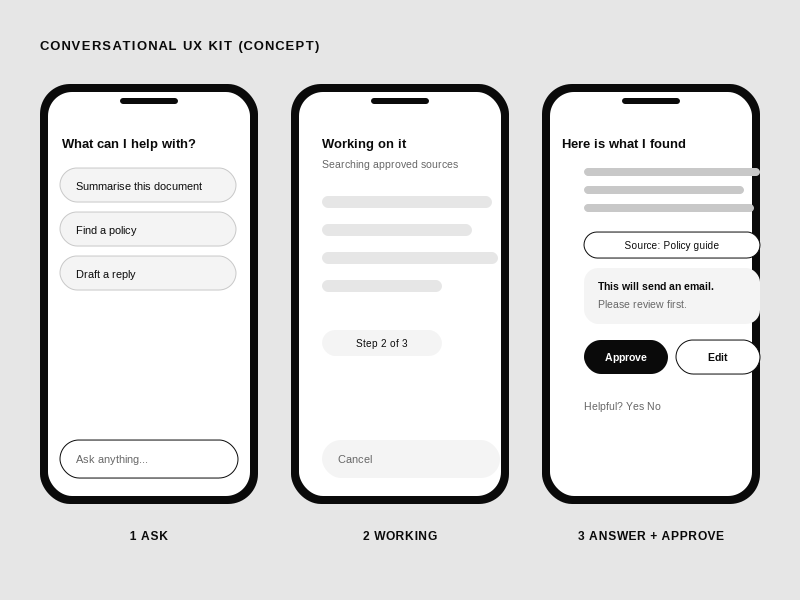
This concept explores the states an AI feature needs: asking, thinking, answering with sources and asking for approval.
The hypothetical problem
AI interfaces often show only the happy path. Users do not know when the system is working, how certain it is or how to correct it, so trust is fragile.
Proposed product experience
- A clear starting state with example prompts
- A visible working state that says what the system is doing
- Answers shown with sources and a way to give feedback
- An approval step before any sensitive action
Conceptual solution
The kit would define reusable patterns for each state, including empty, loading, uncertain, error and approval states, with copy guidelines that avoid overstating certainty.
Key features
- Prompt starters and empty states
- Progress and "working on it" states
- Source and confidence cues
- Approve, edit and undo patterns
- Accessible components with documentation
Potential benefits
- Intended to make AI behaviour easier to understand
- Intended to give developers a consistent set of components
- Hypothesis: honest states may build trust over time
These are intended outcomes and hypotheses. They are not verified results.
Technologies
Figma component libraryInteractive prototypeDesign documentationAccessibility checklist
Design and engineering approach
- Define how the assistant behaves before designing how it looks
- Reuse a small set of consistent components
- Test with real users early using a clickable prototype
Potential applications
- Chat and assistant interfaces
- Onboarding guides
- Voice or text help inside apps
Future implementation considerations
- Test the prototype with representative users
- Hand the components to developers with clear notes
- Check accessibility for keyboard and screen-reader use
Want something like this?
Tell us about your idea. We will explore what a practical version could look like for your users and your business.